What you get with Oz.
Ozmail is the inbox. Ozcal is the calendar. Ozcloud ties them together. Tap any feature to see how it works.
 Ozmail
Mail for all your Google accounts, built for speed.
Light, simple and fast. The basics done properly, and nothing to manage.
Your attention, better spent.
Every inbox in one list, sorted before you see it.
One inbox for every account
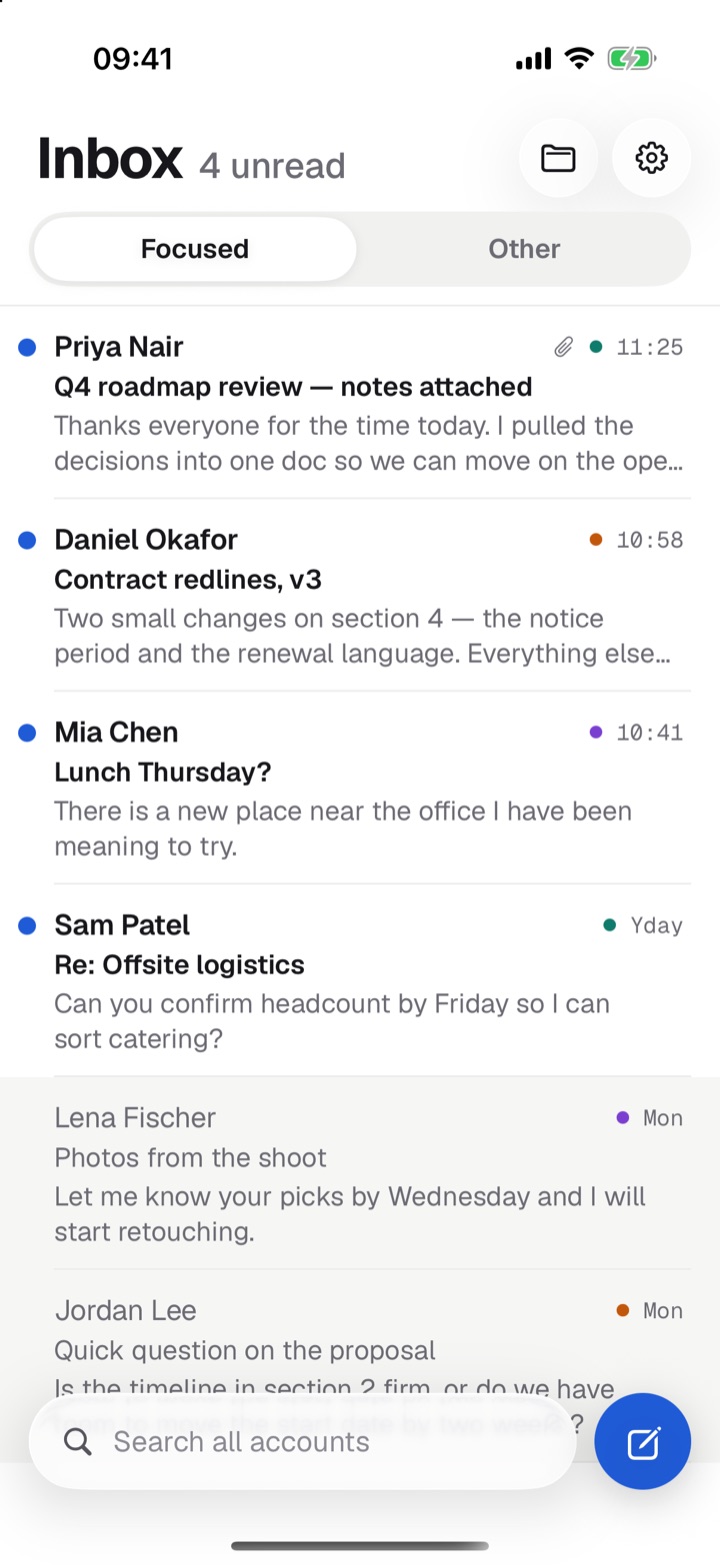
All your Google accounts in one list. Newest first.
Focused and Other
An AI model sorts each email. People and requests go to Focused. Promos and notifications go to Other.
The same on every device
Each email is sorted once, so your Mac and iPhone always agree. A move you make shows up on both.
Move it yourself
Press M to move an email. Press ⇧M to always send that sender there.
It learns
Correct a sender twice. Ozmail makes a rule.
Quiet by default
Only Focused notifies. Only Focused counts on the badge.
Sorted before it pings
A banner waits until the email is sorted. No promo ever buzzes you.
A colour for every account
A dot shows the account. Blue means unread. Read mail fades.
Settings that follow you
Names, colours, signatures and alerts sync between devices.
Fast, from the keyboard.
A full-width list you drive without the mouse.
Move and open
J/K move. ↵ opens. Esc goes back.
Archive and delete
E archives. ⌫ deletes.
Reply in a keystroke
R replies. A replies to all. F forwards.
Flip halves
Tab switches between Focused and Other.
Select many
Use ⇧↑/↓, ⇧-click, ⌘-click or ⌘A.
Jump to a folder
G then a letter. ? lists every shortcut.
Stay in flow
Act on an open email and you land on the next one.
Undo everything
Archive, delete and move all show Undo.
Handle it later. Never forget.
Three small tools that clear your head.
Snooze
H hides an email until a time you pick. It returns to the top of Focused, unread.
Send later
The clock beside Send picks a time. Or press ⇧⌘↵.
Remind me if no reply
Press ⇧H, or use the arrow beside Send. If nobody writes back, the thread returns.
Folders for all three
Snoozed, Scheduled and Follow-ups list what's waiting.
Works with Ozmail closed
Ozcloud keeps the clock. It stores times and Gmail IDs only.
No content in the cloud
Never a subject, a person or any text.
The right button, right on the email.
Ozmail knows what an email is for.
Sign-in codes
The code shows big. Copy & archive in one click.
Magic links
Sign in & archive, straight from the card.
Codes stay private
Codes always land in Focused. They stay out of the list and notifications. The clipboard clears after two minutes.
Unsubscribe
A real one-click Unsubscribe. Or archive everything from that sender.
Bookings to your calendar
Flights, hotels and restaurants get Add to calendar. Never added twice.
Calendar invitations
Yes, Maybe or No inside the email.
Detected on your device
Nothing is sent anywhere to spot a card.
Quick actions
Choose whether each button archives, deletes or keeps the email.
Write once. Send once.
A proper editor. Sends that never get lost.
Rich text
Bold, italic, underline, strikethrough and links.
Quoted replies
The original is quoted, Gmail-style.
Attachments to 35 MB
Drag and drop on the Mac.
Drag recipients
Move a chip between To, Cc and Bcc.
Smart suggestions
From your mail and your calendar's guests.
Drafts save as you type
They land in Gmail, so they're on every device.
Undo send
Messages wait a few seconds before they go.
Never lost, never doubled
Sends are queued and retried until Gmail confirms. Never sent twice.
Archive on reply
Reply and the thread archives itself. Optional.
Os
The gist, and a head start on the reply.
Every AI feature can be switched off.
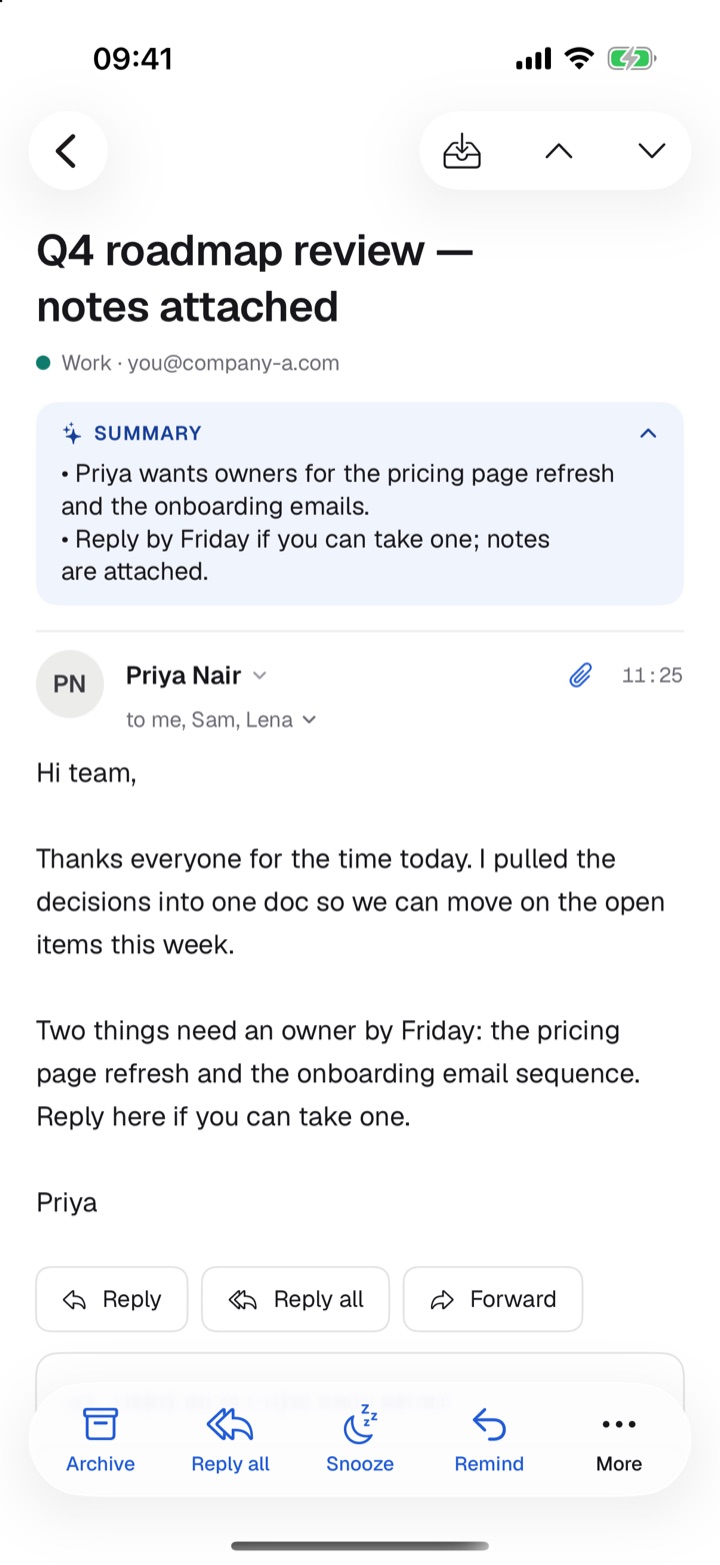
Thread summaries
A short gist under the subject. Fold it away if you like.
Draft a reply
From the thread, or from your own notes. You review and send.
Rewrite
Shorter, friendlier, more formal. Or just fix the spelling.
One-line banners
New Focused mail shows its gist in the notification.
Your key stays safe
The AI key lives in Ozcloud. It never reaches a device.
No training, no retention
Requests only go to zero-data-retention endpoints that don't train on your text.
- Priya wants owners for the pricing page refresh and the onboarding emails.
- Reply by Friday if you can take one; notes are attached.
Instant, even offline.
A full copy of recent mail on each device.
Choose how much to keep
7 days, 1, 3 or 6 months. Set per device.
Open offline
Saved mail opens at once, with no connection.
Search everything
⌘K searches every account. Results show as you type.
Reaches older mail
Search continues in Gmail past what's saved.
Gmail operators work
Try from:, to: or has:attachment.
Every folder
Inbox, Sent, Drafts, Starred, Archive, Spam and Trash.
Gentle on Gmail
Requests are paced. Actions wait and retry instead of failing.
A real iPhone app.
Built for one thumb. As fast as the Mac.
Swipe to act
Swipe right to archive. Swipe left to delete or move.
Select a run
Long-press, then drag down the circles.
Your own action bar
Pick up to four actions under every email. The rest sit under More.
The compose tray
New message, Reply, Reply all and Forward open in one roomy tray.
Switch reply type
Change Reply to Forward from the title.
Attach anything
Files, photos, a camera shot or a scanned document.
Instant mail
New mail is sorted and Focused mail notifies, even with the app closed.
Swipe between halves
Swipe sideways for Focused or Other.
Actions on notifications
Archive or Mark as read. Also on Apple Watch.
Small things that add up.
Updates itself
On the Mac, it checks hourly. It installs when you're not busy.
A real settings window
A sidebar and search.
Tooltips with shortcuts
Hover any button to see its key.
mailto: links
They open a new message in Ozmail.
Next meeting
Ten minutes before, a card offers Join or Directions.
Inbox zero
Clear the list. A new landscape photo fills the window each day.
People in the header
Copy an address, write to them, search their mail, or always send them to Focused or Other.
 Ozcal
A calendar with an assistant you approve.
Built on Google Calendar. Made for work that crosses time zones.
Every calendar, the way you like it.
Each device opens in the view you last used.
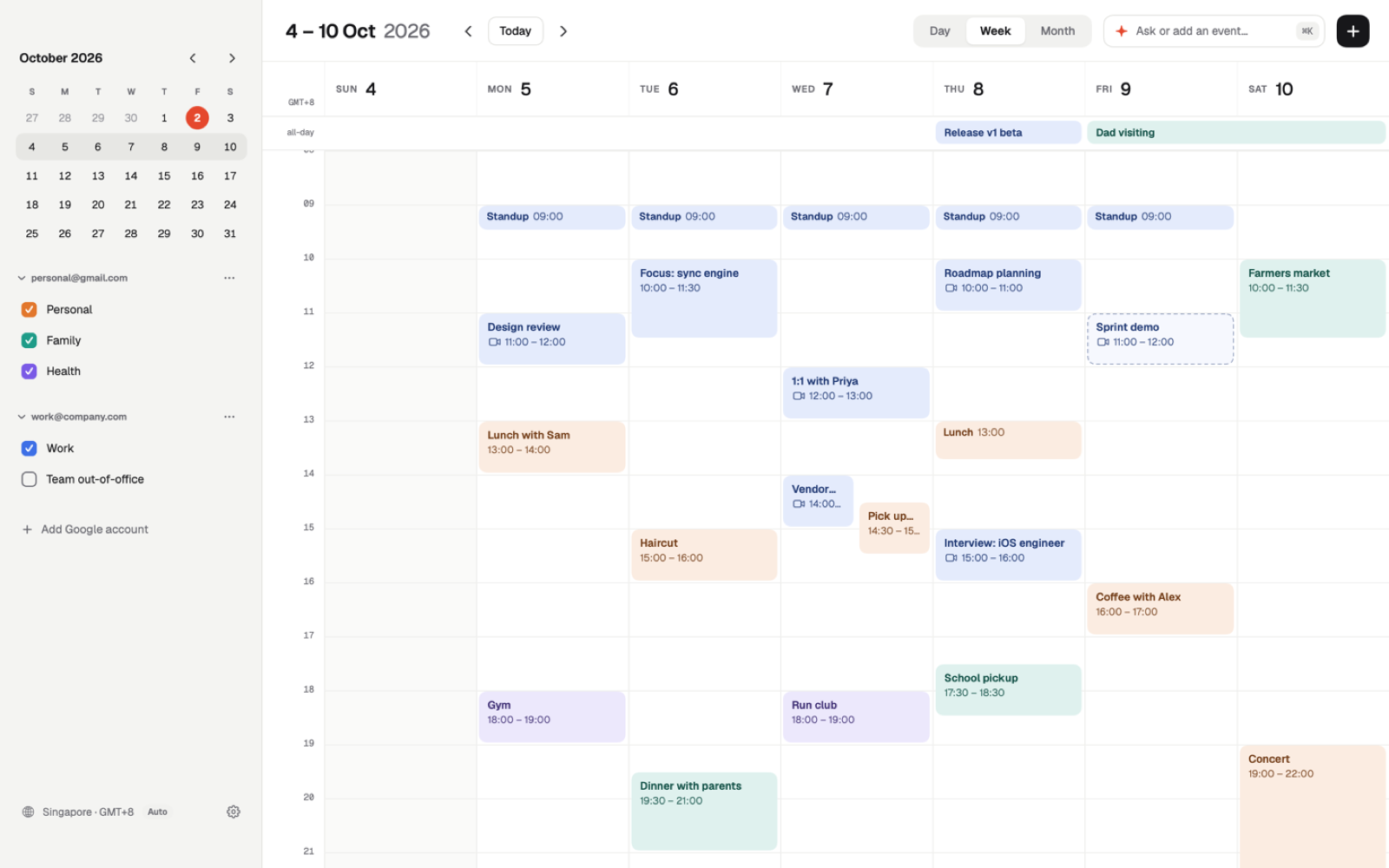
Mac layout
A sidebar with a mini month, your accounts and calendars, and an Up Next card.
Day, week and month
A two-finger swipe moves between days and weeks.
iPhone layout
A 3-day view with a week strip. A month view with a day agenda.
Several Google accounts
All at once.
Show or hide calendars
Synced between devices.
Dark mode and text sizes
Three sizes to choose from.
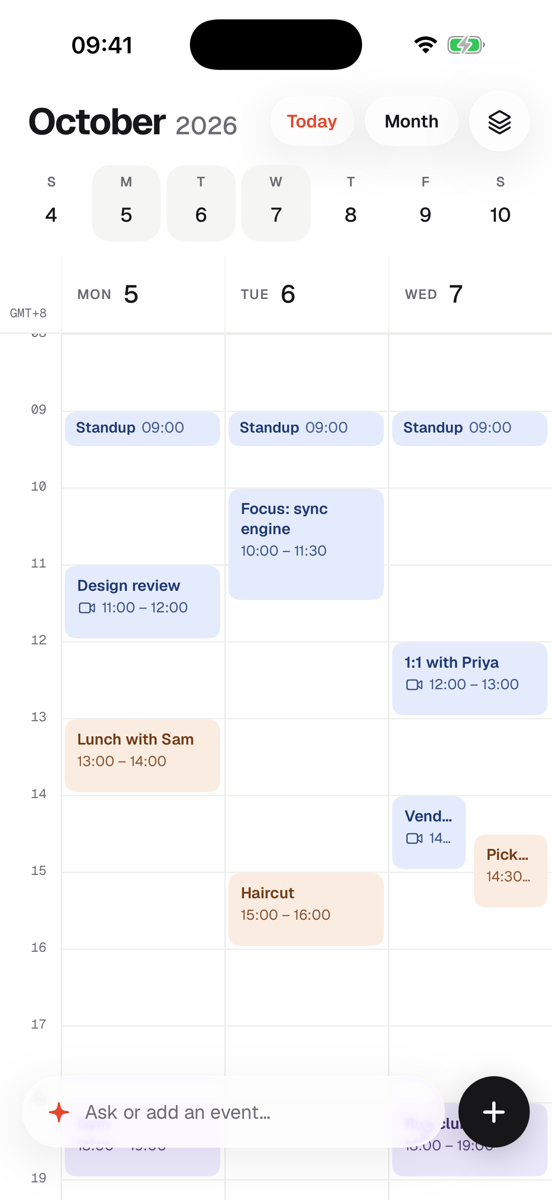
Create, move and change in a drag.
The fastest way to add something is to draw it.
Create anywhere
Use + or ⌘N. Or double-click. Or drag out a time range.
Drag to move
Across days too.
Pull to resize
Drag the bottom edge.
A full editor
Title, place, time, time zone, Meet, calendar, alert, guests and notes.
Place suggestions
Locations come with map suggestions.
Guests as pills
Type an address and a comma. Tap a pill to make them optional.
Reply to invitations
Yes, Maybe or No.
Repeating events
Change one occurrence at a time.
Alerts that tell you when to leave.
Plain English: what, when, where.
One main button
Get directions for a place. Join for a call.
Every call service
Meet, Zoom, Teams and Webex.
Drive time
In-person events show how far you are.
Time to leave
A separate alert at the right moment.
Location stays private
Used only while Ozcal is open. It never leaves your phone.
A live Dock icon
It shows today's date.
Your next meeting, without opening anything.
The Up Next widget, on the Mac and iPhone.
Date and next two meetings
Today's date, and what's coming up.
Mac desktop and iPhone
Add it from Edit Widgets on the Mac, or Edit › Add Widget on iPhone.
A calm end to the day
When nothing's left, it says “No more meetings”.
Instant
It reads what Ozcal already synced. It never calls Google itself.
Your time zone
It follows the zone you chose for the app.
Stop the scheduling back-and-forth.
Send a link. They pick a slot.
Pick from your free slots
Press A on the Mac. Or use the link button on iPhone.
Open availability
Share your working hours instead.
Their time zone
They see slots in their own clock.
The event is created
With their name, email and note. With Meet for calls.
Say where you are
“Mumbai this week, Singapore next.” Links follow you.
Link previews
They look good in Messages, WhatsApp and Slack.
A push when they book
No more checking.
Times shown in your zone: Singapore
Your availability, in any message.
Tick your free times without leaving the conversation.
A keyboard for iPhone
Switch to Ozcal's keyboard in any message field.
Month, then week, then confirm
Pick a day. See its free times. Confirm.
Tick up to three times
Across days. Free days are lit. It looks about six weeks ahead.
Change it for one message
Call, Meeting, Coffee, Lunch, Dinner or Drinks. And the length.
Send your open link instead
One of your permanent booking links. Nothing new is created.
One tap to insert
Ozcal types your times and the link.
Your defaults
Set the usual type, length and link, and how many times one message offers.
Set up once
Settings › General › Keyboard › Keyboards › Add New Keyboard › Ozcal. Allow Full Access, so it can read your free times.
Work across timezones.
No more sums.
Extra cities
Up to two beside your hours. A flag on top.
Half-hour zones
Singapore and Mumbai sit side by side.
Drag shows every city
See an event's time in each zone as you move it.
Search any zone
By city, country, name or abbreviation. Try “IST” or “PST”.
Your own zone
Automatic, or choose one for the whole app and widget.
Ask for it. Approve it.
Nothing changes until you say so.
Plain English
⌘K on the Mac. The Ask bar on iPhone.
Proposal cards
You see the event before it exists.
Approve first
Nothing touches your calendar until you click.
Checked against your words
Dates, weekdays and times. Overlaps are flagged.
Meet links on calls
Titles written your way.
Choices as pills
“Which Yash?” You tap.
Suggests invitees
People you've met.
Proposes a booking link
When you ask for one.
Small things that add up.
Keyboard on the Mac
D/W/M for day, week, month. T for today.
Safe single keys
They never fire while you type.
Updates itself
Like Ozmail.
Settings that follow you
A sidebar and search, synced.
Your mail and calendar stay between you and Google.
Oz doesn't need to read your email or your events to be useful, so it doesn't.
Straight from Google
Messages and events load from Google directly into the app. Ozcloud never stores them. To sort new mail it reads the sender, subject and a short preview in memory, and keeps only the answer.
Handled on your device
Sign-in codes, bookings, unsubscribe, search, suggested times and clash checks are worked out on your Mac or iPhone.
Saved mail stays on the device
The local copy of recent mail lives on that device. You choose how long it keeps it, and can delete it.
The cloud sees times, not content
Snooze, send later and reminders hold only IDs and times. Never a subject, sender, recipient or text.
Metadata-only calls to Google
To work while your devices sleep, Ozcloud asks Google only for label IDs, timestamps, whether an event changed or ended, and when you are busy. Never a subject, body, event title or guest.
Sign-in codes stay local
Codes are found on your device, kept out of the list and notifications, cleared from the clipboard after two minutes, and never sent to an AI.
Tokens locked away
The only thing Ozcloud keeps for your accounts is your Google sign-in tokens, encrypted with a key made just for you. Your OpenRouter key, if you add one, is encrypted the same way.
AI is optional
Summaries, reply drafts, rewrites, notification lines, the Focused / Other sort and Ozcal's assistant are the only features that send text anywhere. Turn them off and nothing leaves your device.
No training, no retention
Every AI request is limited to OpenRouter endpoints with zero data retention, from providers that do not collect it or train on it. Ozcloud doesn't keep the text, and holds the one-line notification only until your devices have it, at most 15 minutes.
No ads, no tracking
No analytics or crash-reporting SDKs. Your data is never sold, shared or used to train models.
Delete any time
Settings › Ozcloud › Delete my Ozcloud account revokes Google's access and deletes what Ozcloud holds. Your mail and calendars stay in Google.
The full detail is on the privacy page.
 Ozcloud
The small service behind both apps.
Your accounts and settings sync across devices and apps through encrypted Ozcloud. It also keeps the clocks for snooze and scheduled send.
MacOzmail + OzcalOzcloudiPhoneOzmail + OzcalYour accounts, linked once
Add your Google accounts once and they show up in Ozmail and Ozcal. By invitation.
Accounts shared
Link an account in either app. It works in both.
Settings sync
And each device's last view.
Your devices, listed
Every signed-in device, with Sign out.
Mail goes direct
Between your device and Google. Ozcloud never stores it.
Keys kept off devices
Google tokens are stored encrypted. The AI key never reaches a device.
Delete any time
Remove your Ozcloud account from Settings.
How data is handled is on the privacy page.
Ready to fly through email?
Oz is invite-only while it's small. Oz works with Google accounts only for now (Gmail and Google Workspace). Tell us the one you'd sign in with and we'll get you set up.